Schema Diagram and Graph Statistics
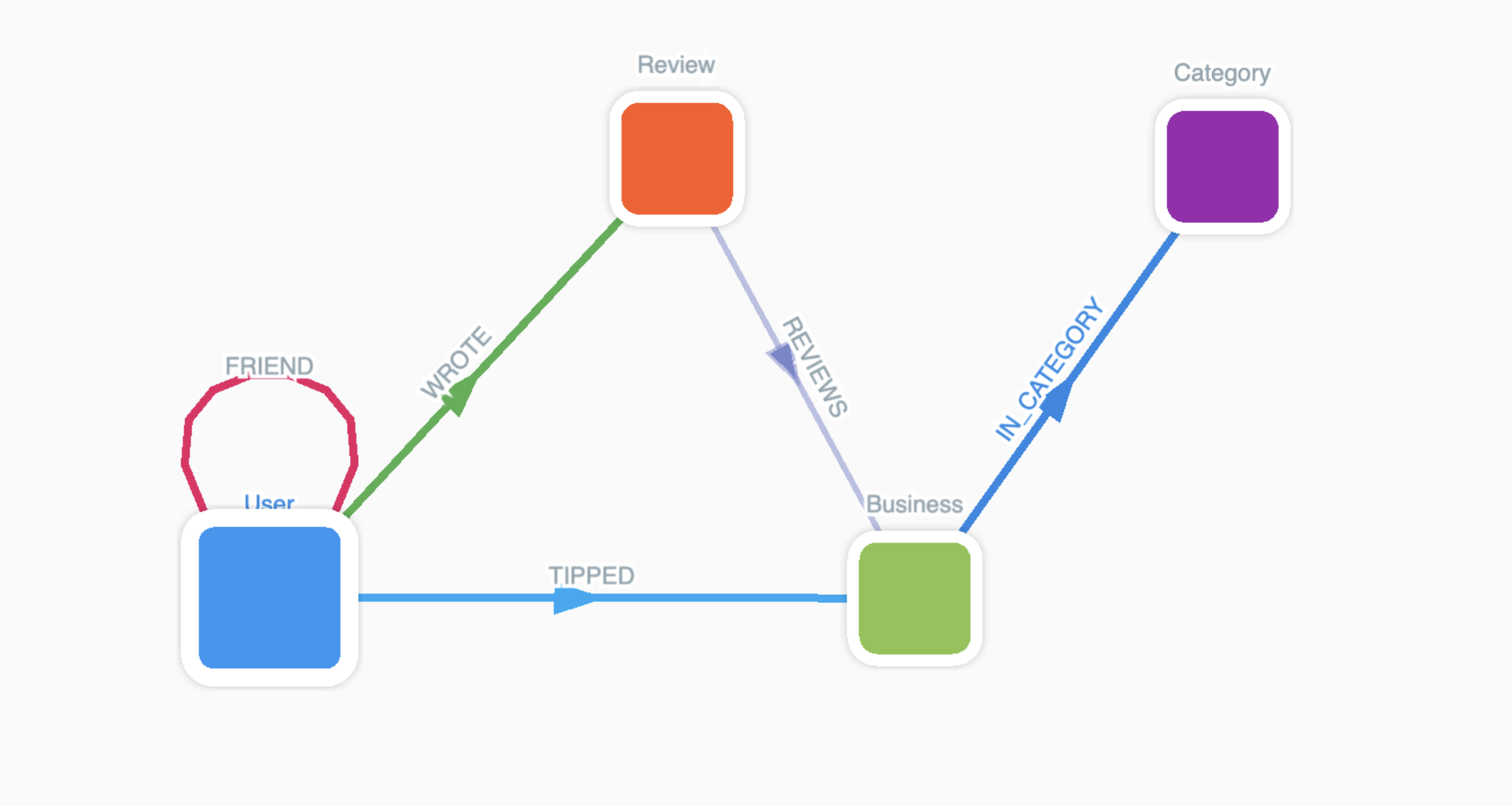
Node Statistics
| Node Label | Count |
|---|---|
| Business | 150,346 |
| Category | 1,311 |
| Review | 6,990,247 |
| User | 1,987,897 |
Edge Statistics
| Relationship | Count |
|---|---|
| (:User)-[:FRIEND]-(:User) | 14,611,748 |
| (:Business)-[:IN_CATEGORY]-(:Category) | 668,592 |
| (:Review)-[:REVIEWS]-(:Business) | 6,990,247 |
| (:User)-[:TIPPED]-(:Tip) | 908,915 |
| (:User)-[:WROTE]-(:Review) | 6,990,247 |
Data Loading
Overview
The data ingestion pipeline has two stages. Initially, Yelp datasets are stored in Hadoop Distributed
File System (HDFS). We then utilize Spark to perform schema enforcement and type casting, persisting the
structured data as Delta Lake tables registered within a Hive Metastore. PuppyGraph then interfaces directly
with this Metastore via a schema.json file, enabling a zero-ETL graph overlay on the existing
data
lake.
Spark Preprocessing
So first, we need to create DataFrames from the raw JSON files, and write things into Delta Lake tables. In the following code blocks, we reused those we used to build a graph with GraphFrames.
business_df = spark.read.json("hdfs://master:9000/yelp/yelp_academic_dataset_business.json")
user_df = spark.read.json("hdfs://master:9000/yelp/yelp_academic_dataset_user.json")
valid_user_ids = user_df.select("user_id").distinct()
valid_business_ids = business_df.select("business_id").distinct()
review_df = spark.read.json("hdfs://master:9000/yelp/yelp_academic_dataset_review.json")
valid_review_df = (
    review_df
    .join(valid_user_ids, on="user_id", how="left_semi")
    .join(valid_business_ids, on="business_id", how="left_semi")
)
tip_df = spark.read.json("hdfs://master:9000/yelp/yelp_academic_dataset_tip.json")
For the Category nodes and IN_CATEGORY edges, we need some preprocessing.
from pyspark.sql.functions import split, explode, trim, col, lit
exploded = business_df.filter(col("categories").isNotNull()) \
    .withColumn("category", explode(split("categories", ","))) \
    .withColumn("category", trim(col("category")))
category_vertices = exploded \
    .select("category") \
    .distinct() \
    .withColumnRenamed("category", "id") \
    .withColumn("type", lit("category"))
category_edges = exploded.selectExpr(
    "business_id as src",
    "trim(category) as dst",
    "'in_category' as relationship"
)
Then we process the FRIEND edges.
from pyspark.sql.functions import split, explode, col, trim
from pyspark.sql import functions as F

valid_user_ids = (
    user_df
    .select(F.col("user_id").alias("dst"))
    .distinct()
)
friend_edges = (
    user_df
    .filter(
        F.col("friends").isNotNull()
        & (F.trim(F.col("friends")) != "")
        & (F.trim(F.col("friends")) != "None")
    )
    .select(
        F.col("user_id").alias("src"),
        F.explode(
            F.split(F.col("friends"), r",\s*")
        ).alias("dst")
    )
    .withColumn("dst", F.trim(F.col("dst")))
    .join(valid_user_ids, on="dst", how="left_semi")
    .withColumn("relationship", F.lit("friend"))
)
Then the REVIEWS, WROTE, TIPPED, and FOR edges.
reviewed_edges = valid_review_df.selectExpr(
    "review_id as src",
    "business_id as dst",
    "'reviews' as relationship"
)
wrote_edges = valid_review_df.selectExpr(
    "user_id as src",
    "review_id as dst",
    "'wrote' as relationship"
)
tipped_edges = tip_df.selectExpr(
    "user_id as src",
    "business_id as dst",
    "'tipped' as relationship",
    "text",
    "date",
    "compliment_count"
)
Then we can write these DataFrames as Delta Tables on our HDFS:
business_vertices.write \
    .format("delta") \
    .mode("errorifexists") \
    .saveAsTable("yelp.yelp_business")

user_vertices.write \
    .format("delta") \
    .mode("errorifexists") \
    .saveAsTable("yelp.yelp_user")

review_vertices.write \
    .format("delta") \
    .mode("errorifexists") \
    .saveAsTable("yelp.yelp_review")

category_vertices.write \
    .format("delta") \
    .mode("errorifexists") \
    .saveAsTable("yelp.yelp_category")

reviewed_edges.write \
    .format("delta") \
    .mode("errorifexists") \
    .saveAsTable("yelp.yelp_reviews_edge")

wrote_edges.write \
    .format("delta") \
    .mode("errorifexists") \
    .saveAsTable("yelp.yelp_wrote_edge")

tipped_edges.write \
    .format("delta") \
    .mode("errorifexists") \
    .saveAsTable("yelp.yelp_tipped_edge")

category_edges.write \
    .format("delta") \
    .mode("errorifexists") \
    .saveAsTable("yelp.yelp_in_category_edge")

friend_edges.write \
    .format("delta") \
    .mode("errorifexists") \
    .saveAsTable("yelp.yelp_friend_edge")
Now that we have all the Delta tables we need, we can go to PuppyGraph GUI to map nodes and edges from these tables.
PuppyGraph Web UI
Once we open PuppyGraph browser UI, we need to create a "catalog". A catalog is a configuration and connection definition pointing to an external data source. In our experiments, we used Hadoop HDFS as our data storage, Hive Metastore as our metastore type, and Delta Lake as file format.
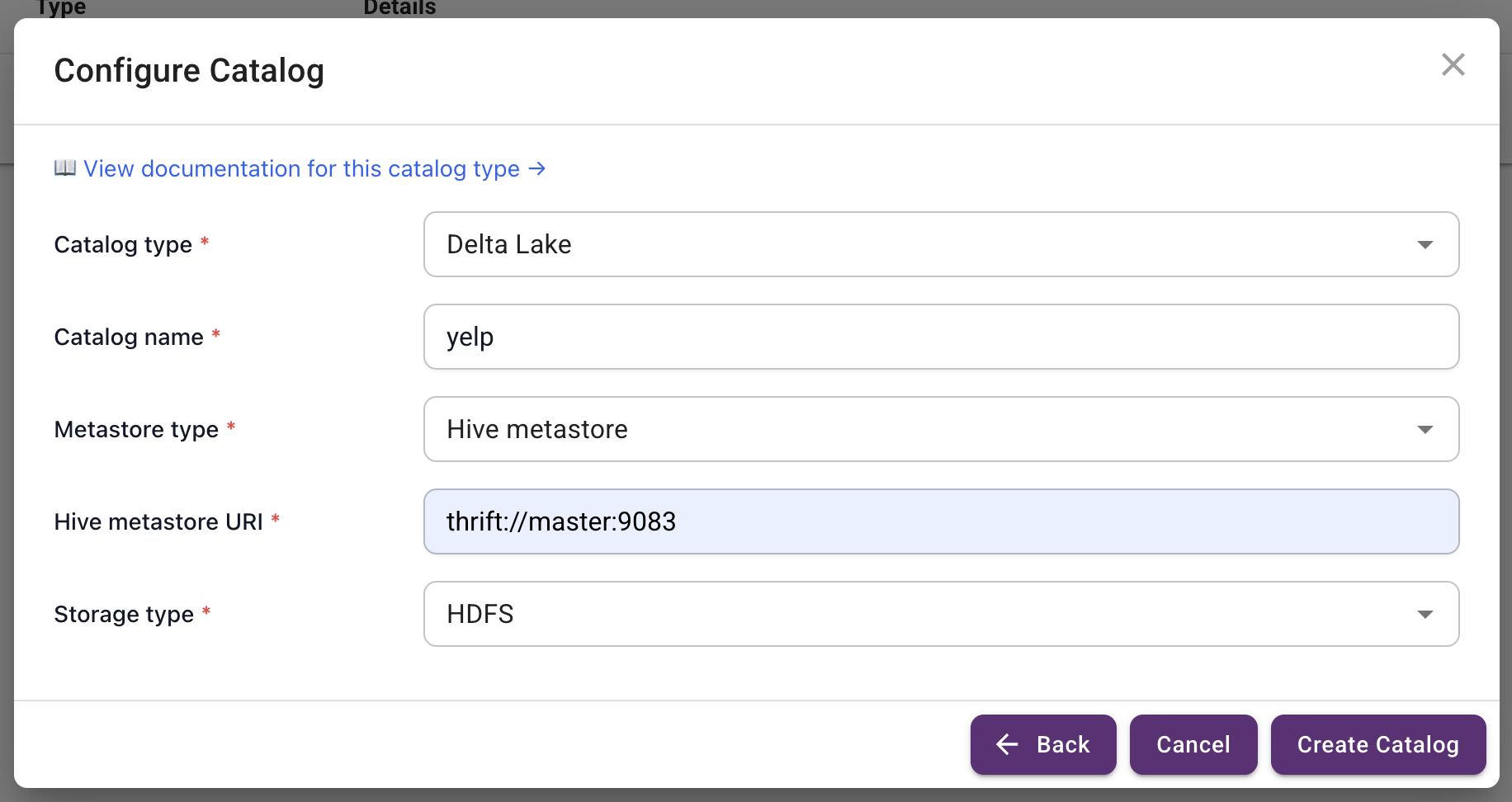
Since we reused the codes to create vertices and edges for GraphFrames, each of our "Node" tables contains attribute "type" which has a string value of the name of the node label, and the id attribute is renamed from "[label_name]_id" to "id", and similarly, each of our "Edge" tables contains attribute "relationship" which has a string value of the name of the edge label, and the from and to attributes are renamed from "[label_name]_id" to "src" and "dst", to accommodate GraphFrames convention.
Define Nodes
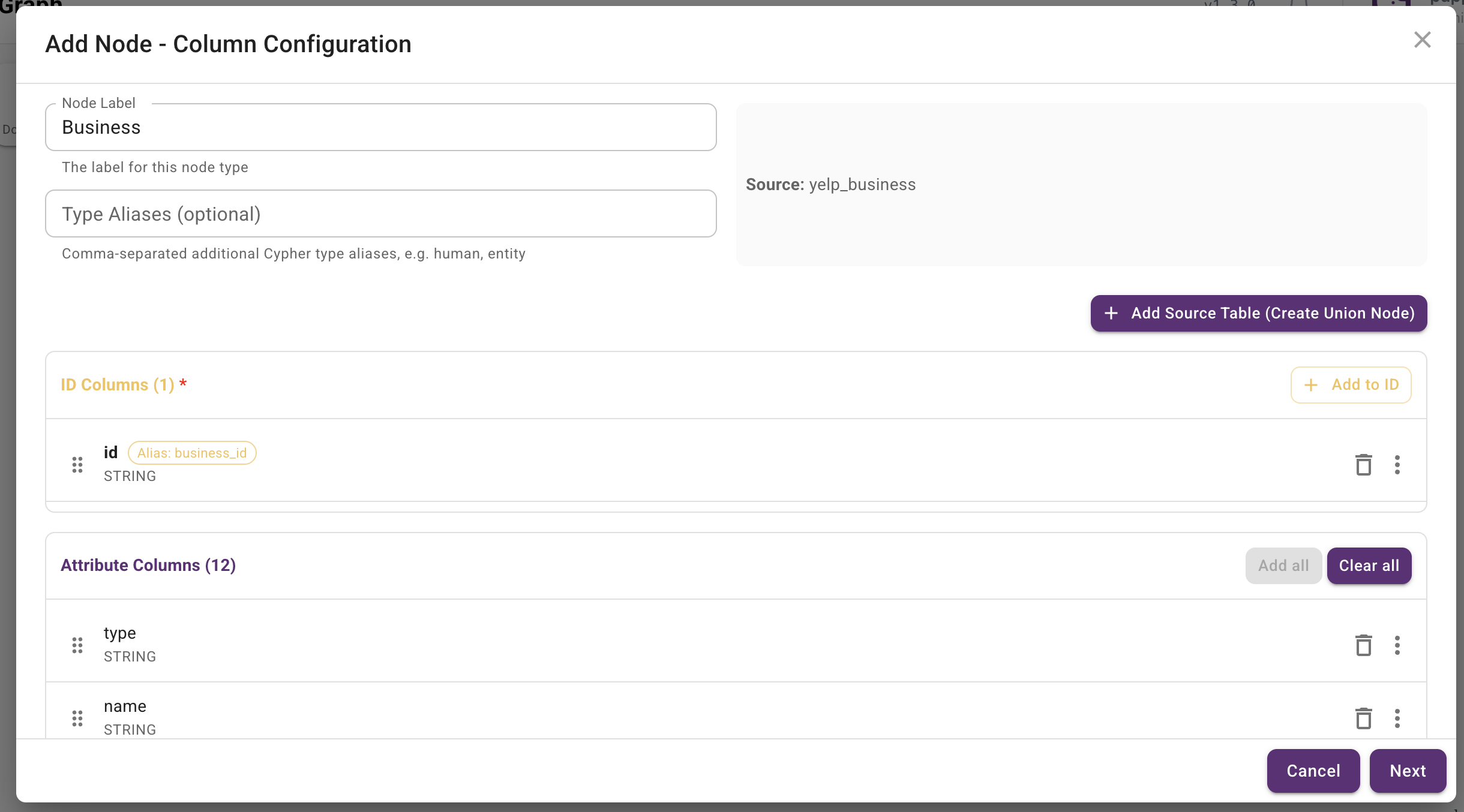
First we define Business nodes. For Business, select id as the key, and add these
attributes: address, attributes, categories, city, hours, is_open, latitude, longitude, name, postal_code,
review_count, stars, state.
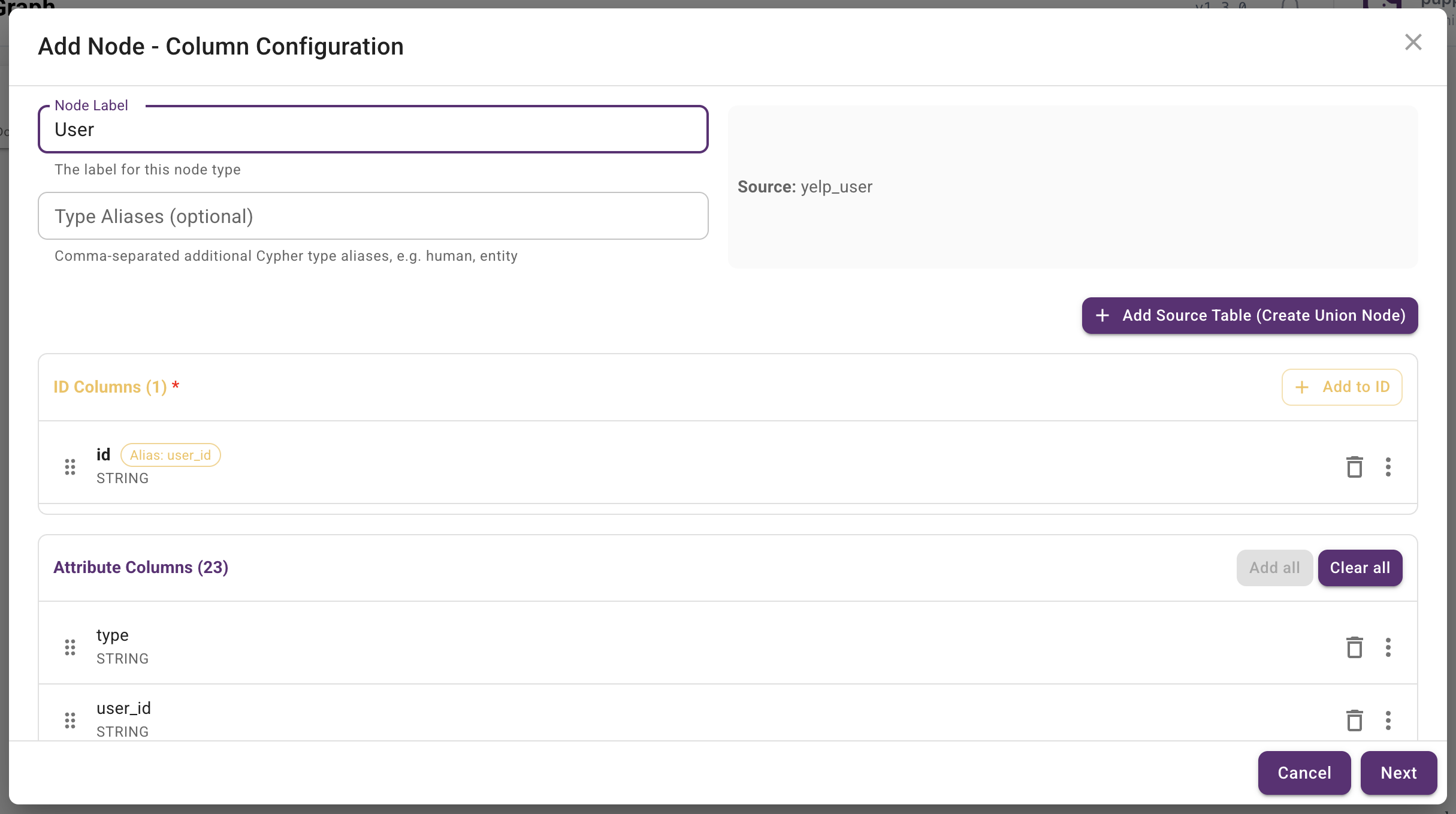
Next we define User nodes. For User, select id as the key, and add these attributes:
average_stars,
compliment_cool,
compliment_cute,
compliment_funny, compliment_hot, compliment_list, compliment_more, compliment_note, compliment_photos,
compliment_plain, compliment_profile, compliment_writer, cool, elite, fans, friends, funny, name,
review_count,
useful, yelping_since.
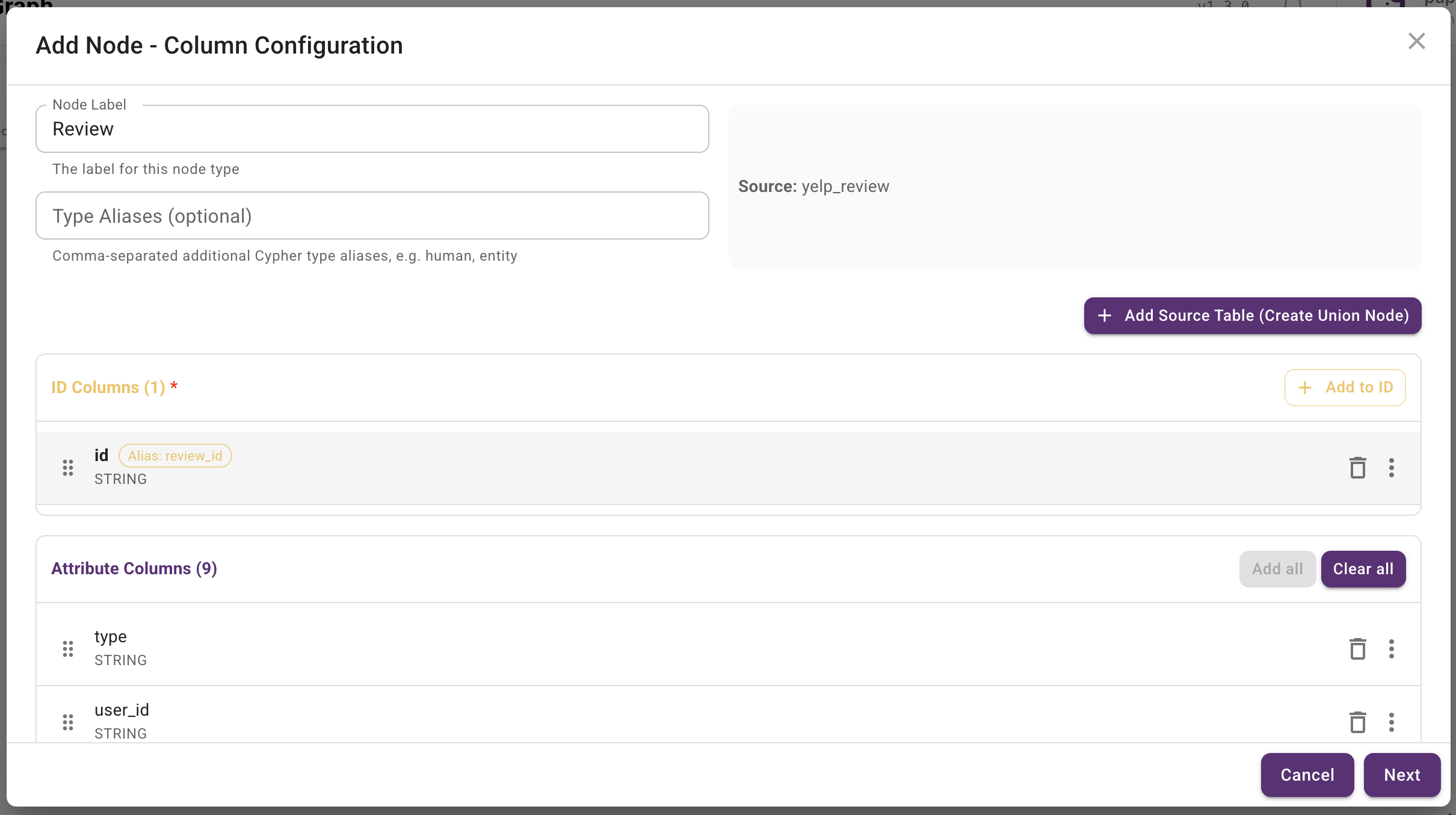
Next we define Review nodes. For Review, select id as the key, and add these attributes:
business_id, cool, date, funny, stars, text, useful, user_id.
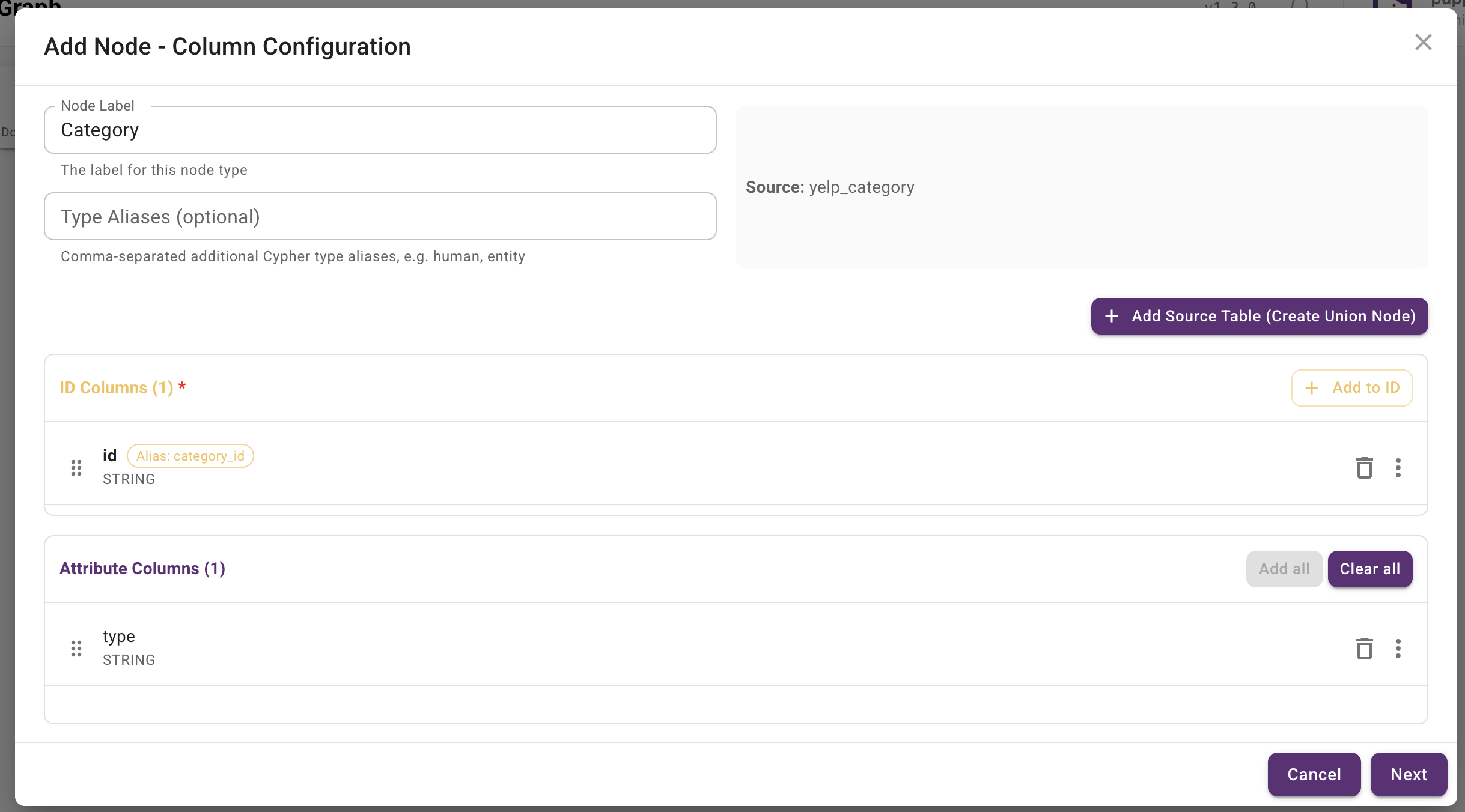
Next we define Category nodes. For Category, add these attributes: type.
Define Edges
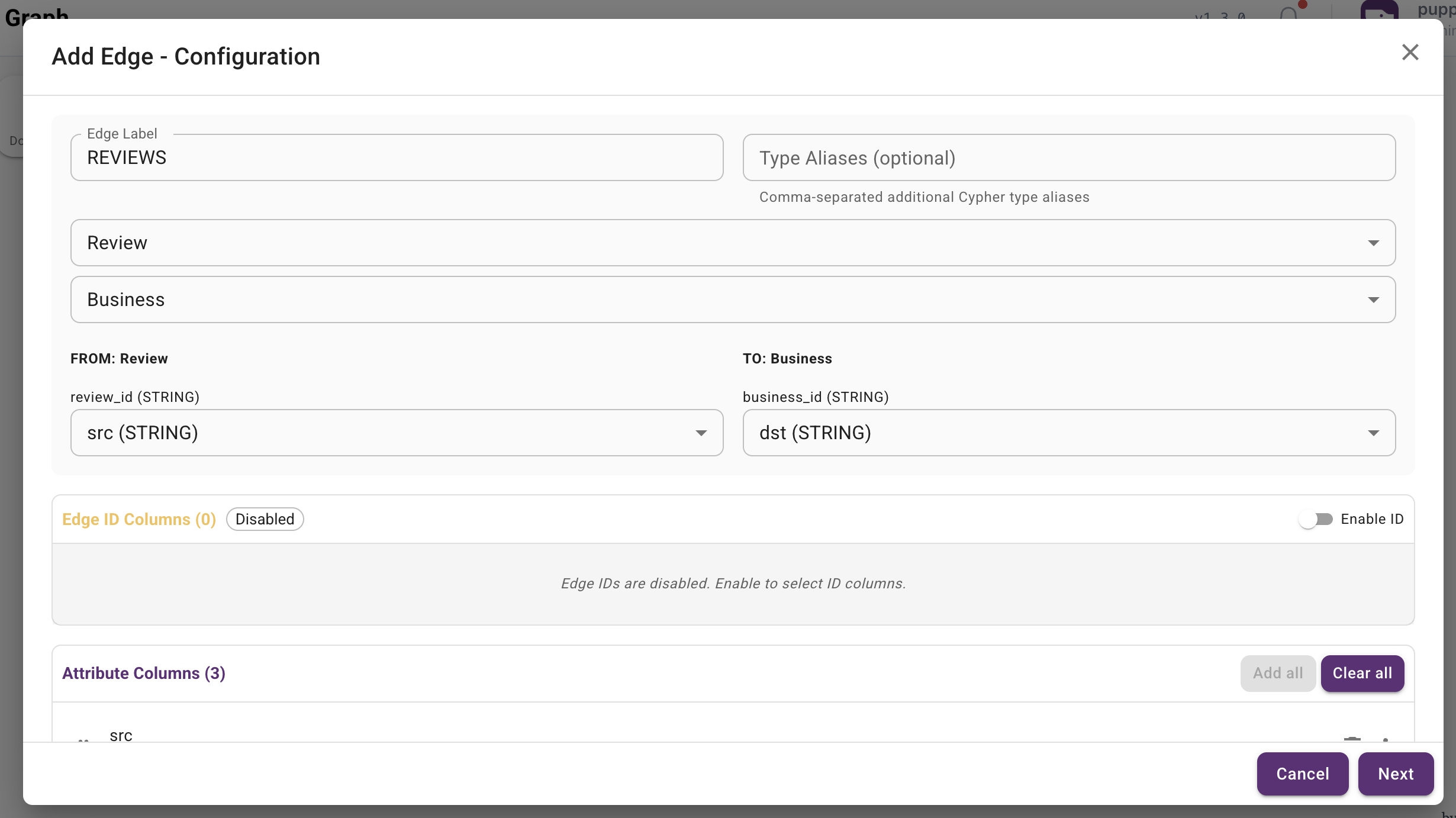
Now we define edges. First, for REVIEWS edge, select src as
the "From Key" and dst as the "To
Key". This creates an relation from Review to Business. This edge has
relationship attribute.
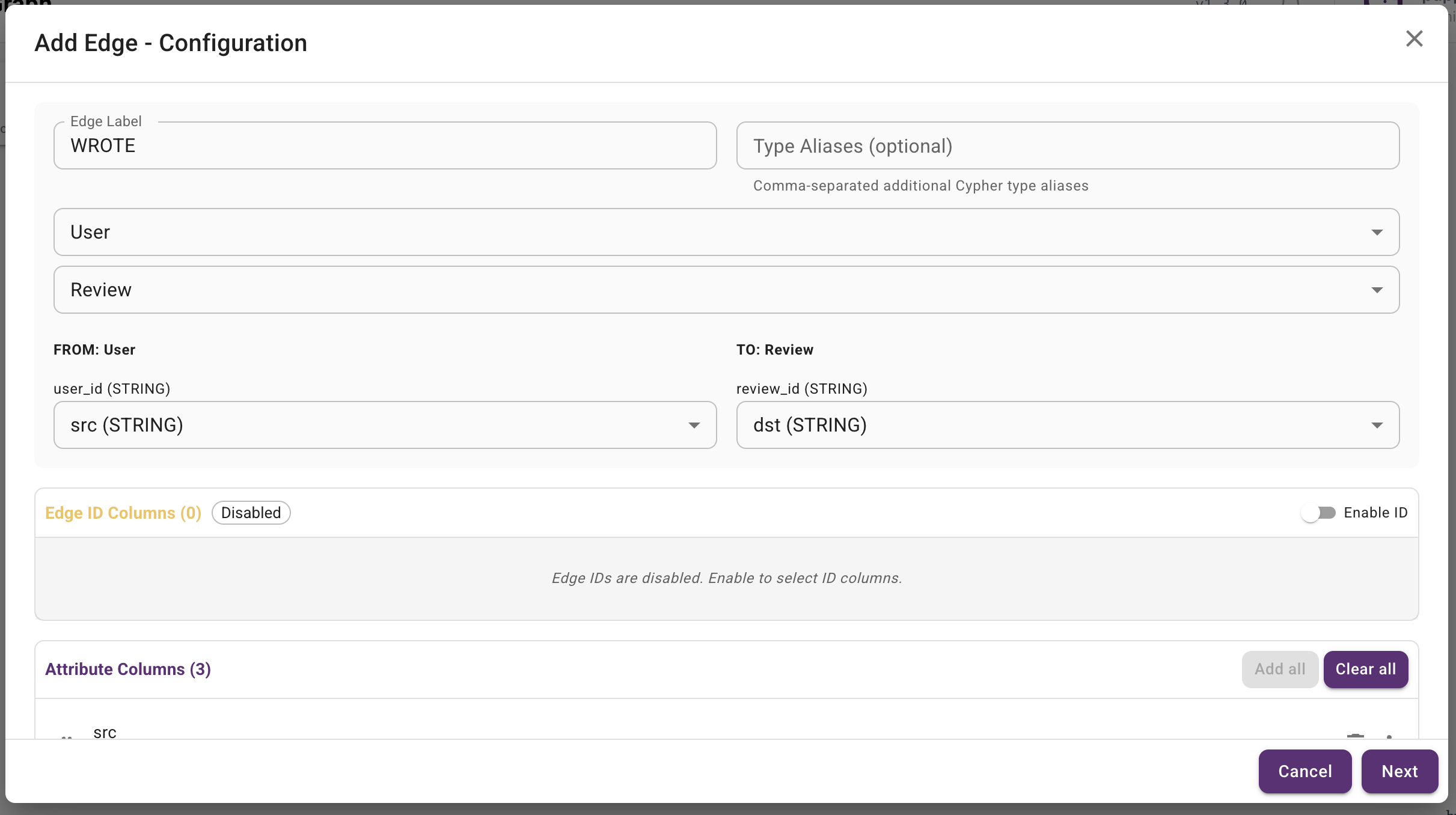
For WROTE edge, select src as the "From Key" and dst as the "To
Key". This creates an relation from User to Review.
This edge has relationship attribute.
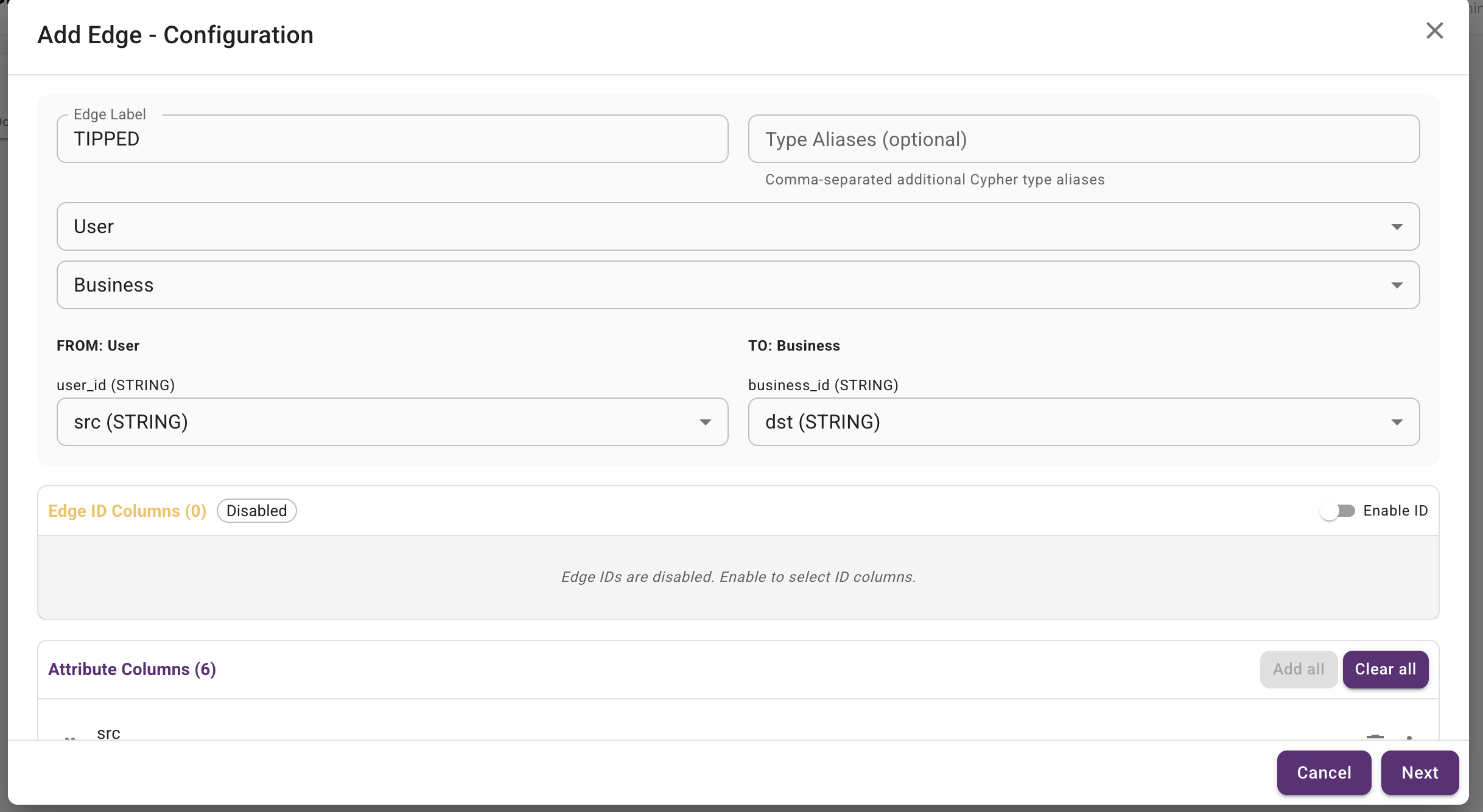
For TIPPED edge, select src as the "From
Key" and
dst as the "To Key". This creates an relation from User to Business.
This edge has relationship, text, date, compliment_count
as attributes.
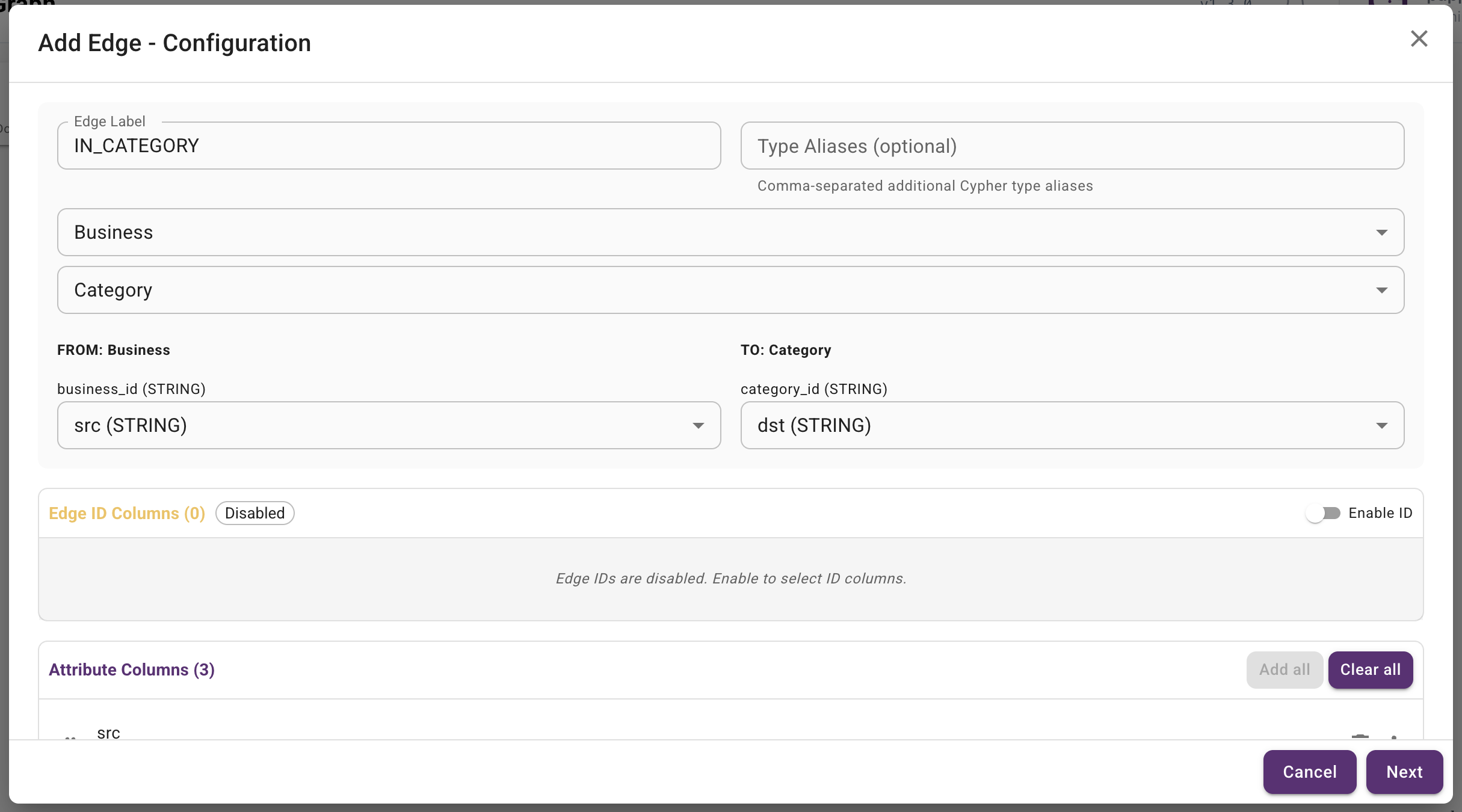
For IN_CATEGORY edge, select src as the "From Key" and dst as the "To
Key". This creates an relation from Business to Category. This edge has attributes
relationship.
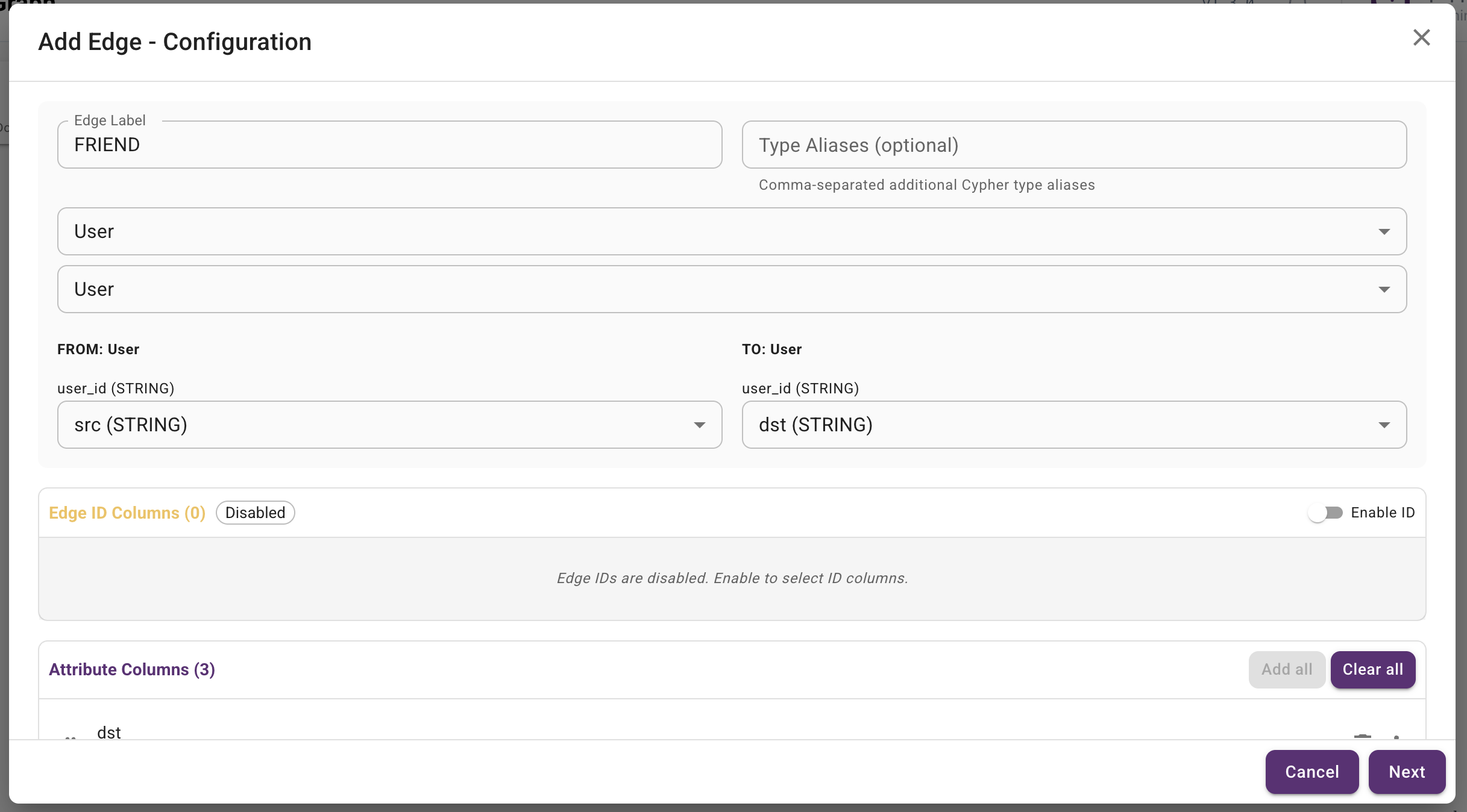
For FRIEND edge, select src as the "From Key" and dst as the "To
Key". This creates an relation from User to User.
This edge has relationship attribute.
Queries
Select a query below to view its logic and description.
Q1. Find the friends of all "John"s
This query retrieves the name and user ID of up to 20 friends of users named "John".
// Q1. Find the friends of all "John"s
MATCH (:User {name: 'John'})-[:FRIEND]->(friend:User)
RETURN friend.name AS name, friend.user_id AS user_id
LIMIT 20
Equivalent query in GQL standard:
MATCH (:User {name: "John"})-[:FRIEND]->(friend)
RETURN friend.name, friend.user_id
LIMIT 20
Q2. Find all users within two friend hops of a given user
This query finds all distinct users reachable within one or two FRIEND hops from a starting user.
// Q2. Find all users within two friend hops of a given user
MATCH (start:User {user_id: 'Oi1qbcz2m2SnwUeztGYcnQ'})-[:FRIEND*1..2]-(neighbor:User)
WHERE neighbor <> start
RETURN DISTINCT neighbor.name AS name, neighbor.user_id AS user_id
ORDER BY name, user_id
LIMIT 100
Equivalent query in GQL standard:
MATCH p = (start:User {user_id: "Oi1qbcz2m2SnwUeztGYcnQ"})-[:FRIEND]-{1,2}(neighbor:User)
WHERE neighbor != start
RETURN DISTINCT neighbor.name AS name, neighbor.user_id AS user_id
ORDER BY name, user_id
LIMIT 100
Q3. Get 3-hop neighbors of a given user
This query identifies the unique names and user IDs of all neighbors exactly three friend-connections away from a given user.
// Q3. Get three-hop neighbors of a given user
MATCH (start:User {user_id: 'Oi1qbcz2m2SnwUeztGYcnQ'})-[:FRIEND*3]-(neighbor:User)
WHERE neighbor <> start
RETURN DISTINCT neighbor.name AS name, neighbor.user_id AS user_id
Equivalent query in GQL standard:
MATCH (start:User {user_id: "Oi1qbcz2m2SnwUeztGYcnQ"})-[:FRIEND]-{3}(neighbor)
WHERE neighbor.user_id != "Oi1qbcz2m2SnwUeztGYcnQ"
RETURN DISTINCT neighbor.name, neighbor.user_id
Q4. Find high-review-count users within two friend hops
This query finds distinct users within one or two FRIEND hops of a starting user, filtered to users with at least 100 reviews and an average rating of 4.0 or higher.
// Q4. Find high-review-count users within two friend hops
MATCH (start:User {user_id: 'Oi1qbcz2m2SnwUeztGYcnQ'})-[:FRIEND*1..2]-(neighbor:User)
WHERE neighbor <> start
  AND neighbor.review_count >= 100
  AND neighbor.average_stars >= 4.0
RETURN DISTINCT neighbor.name AS name,
       neighbor.user_id AS user_id,
       neighbor.review_count AS review_count,
       neighbor.average_stars AS average_stars
ORDER BY review_count DESC, average_stars DESC
LIMIT 100
Equivalent query in GQL standard:
MATCH p = (start:User {user_id: "Oi1qbcz2m2SnwUeztGYcnQ"})-[:FRIEND]-{1,2}(neighbor:User)
WHERE neighbor != start
  AND neighbor.review_count >= 100
  AND neighbor.average_stars >= 4.0
RETURN DISTINCT neighbor.name AS name,
       neighbor.user_id AS user_id,
       neighbor.review_count AS review_count,
       neighbor.average_stars AS average_stars
ORDER BY review_count DESC, average_stars DESC
LIMIT 100
Q5. Find open, highly rated businesses in Pennsylvania
This query filters individual Business nodes by state, open status, rating, and review count without traversing edges.
// Q5. Find open, highly rated businesses in Pennsylvania
MATCH (b:Business)
WHERE b.state = 'PA'
  AND b.is_open = 1
  AND b.rating >= 4.5
  AND b.review_count >= 100
RETURN b.name AS name, b.city AS city, b.rating AS rating,
       b.review_count AS review_count
ORDER BY rating DESC, review_count DESC
LIMIT 25
Equivalent query in GQL standard:
MATCH (b:Business)
WHERE b.state = "PA"
  AND b.is_open = 1
  AND b.rating >= 4.5
  AND b.review_count >= 100
RETURN b.name, b.city, b.rating, b.review_count
ORDER BY b.rating DESC, b.review_count DESC
LIMIT 25
Q6. Find useful five-star review edges
The Yelp Neo4j schema stores review attributes on Review nodes that mediate User-to-Business edges, so this query filters those edge records by rating and usefulness.
// Q6. Find useful five-star reviews
MATCH (u:User)-[:WROTE]->(r:Review)-[:REVIEWS]->(b:Business)
WHERE r.stars = 5 AND r.useful >= 10
RETURN u.name AS user_name,
       substring(toString(id(r)), 7, 22) AS review_id,
       r.stars AS stars,
       r.useful AS useful_votes,
       b.name AS business_name,
       b.city AS city
ORDER BY useful_votes DESC
LIMIT 20
Equivalent query in GQL standard:
MATCH (u:User)-[:WROTE]->(r:Review)-[:REVIEWS]->(b:Business)
WHERE r.stars = 5
  AND r.useful >= 10
RETURN u.name AS user_name,
       r.id AS review_id,
       r.stars AS stars,
       r.useful AS useful_votes,
       b.name AS business_name,
       b.city AS city
ORDER BY useful_votes DESC
LIMIT 20
Q7. Check whether Steven can reach Niki within four friend hops
This query tests whether a bounded friend path exists between two User nodes.
// Q7. Check whether the two users are connected within four friend hops
// PuppyGraph does not support shortestPath inside OPTIONAL MATCH. These two
// users are connected in this dataset, so a regular shortestPath MATCH returns
// the same reachable=true result without that unsupported combination.
MATCH p = shortestPath(
  (:User {user_id: 'Oi1qbcz2m2SnwUeztGYcnQ'})-[:FRIEND*1..4]-
  (:User {user_id: 'WwulXySQN8t2hwqH_yWurA'})
)
RETURN true AS reachable
Equivalent query in GQL standard:
MATCH p = ANY (source:User {user_id: "Oi1qbcz2m2SnwUeztGYcnQ"})-[:FRIEND]-{1,4}(target:User {user_id: "WwulXySQN8t2hwqH_yWurA"})
RETURN true AS reachable
Q8. Find the shortest friend path between Steven and Niki
This query returns the shortest bounded path connecting two users in the friend graph.
// Q8. Find the shortest friend path between the two users
MATCH p = shortestPath(
  (:User {user_id: 'Oi1qbcz2m2SnwUeztGYcnQ'})-[:FRIEND*1..6]-
  (:User {user_id: 'WwulXySQN8t2hwqH_yWurA'})
)
RETURN [n IN nodes(p) | n.name] AS user_path, length(p) AS hop_count
Equivalent query in GQL standard:
MATCH p = SHORTEST (:User {user_id: "Oi1qbcz2m2SnwUeztGYcnQ"})-[:FRIEND]-{1,6}(:User {user_id: "WwulXySQN8t2hwqH_yWurA"})
RETURN p
Q9. Enumerate simple friend paths between Steven and Niki up to length three
This query materializes acyclic friend paths up to three hops between two users.
// Q9. Enumerate simple friend paths between the two users up to length three
// PuppyGraph does not support single(...) iterable predicates. Compare the
// bounded path's node positions directly to preserve simple-path semantics,
// the list-valued result, global ordering, and the original LIMIT.
MATCH p = (:User {user_id: 'Oi1qbcz2m2SnwUeztGYcnQ'})-[:FRIEND*1..3]-
          (:User {user_id: 'WwulXySQN8t2hwqH_yWurA'})
WHERE length(p) = 1
   OR (length(p) = 2
       AND nodes(p)[0] <> nodes(p)[1]
       AND nodes(p)[0] <> nodes(p)[2]
       AND nodes(p)[1] <> nodes(p)[2])
   OR (length(p) = 3
       AND nodes(p)[0] <> nodes(p)[1]
       AND nodes(p)[0] <> nodes(p)[2]
       AND nodes(p)[0] <> nodes(p)[3]
       AND nodes(p)[1] <> nodes(p)[2]
       AND nodes(p)[1] <> nodes(p)[3]
       AND nodes(p)[2] <> nodes(p)[3])
RETURN [n IN nodes(p) | n.user_id] AS user_ids, length(p) AS hop_count
ORDER BY hop_count ASC
LIMIT 20
Equivalent query in GQL standard:
MATCH p = ACYCLIC (:User {user_id: "Oi1qbcz2m2SnwUeztGYcnQ"})-[:FRIEND]-{1,3}(:User {user_id: "WwulXySQN8t2hwqH_yWurA"})
RETURN p
LIMIT 20
Q10. Find friend triangles around Steven
This query finds three-user cycles in the friend graph anchored at Steven.
// Q10. Find friend triangles around the given user
MATCH (a:User {user_id: 'Oi1qbcz2m2SnwUeztGYcnQ'})-[:FRIEND]-(b:User),
      (b)-[:FRIEND]-(c:User),
      (c)-[:FRIEND]-(a)
WHERE a <> b AND b <> c AND a <> c
RETURN DISTINCT b.name AS friend_one, c.name AS friend_two
LIMIT 25
Equivalent query in GQL standard:
MATCH (a:User {user_id: "Oi1qbcz2m2SnwUeztGYcnQ"})-[:FRIEND]-(b:User),
      (b)-[:FRIEND]-(c:User),
      (c)-[:FRIEND]-(a)
WHERE a <> b AND b <> c AND a <> c
RETURN DISTINCT b.name AS friend_one, c.name AS friend_two
LIMIT 25
Q11. Find friend squares around Steven
This query searches for four-user cycles that include Steven.
// Q11. Find friend squares around the given user
MATCH (a:User {user_id: 'Oi1qbcz2m2SnwUeztGYcnQ'})-[:FRIEND]-(b:User),
      (b)-[:FRIEND]-(c:User),
      (c)-[:FRIEND]-(d:User),
      (d)-[:FRIEND]-(a)
WHERE a <> b AND a <> c AND a <> d
  AND b <> c AND b <> d AND c <> d
RETURN DISTINCT b.name AS first_friend,
       c.name AS bridge_friend,
       d.name AS second_friend
LIMIT 25
Equivalent query in GQL standard:
MATCH (a:User {user_id: "Oi1qbcz2m2SnwUeztGYcnQ"})-[:FRIEND]-(b:User),
      (b)-[:FRIEND]-(c:User),
      (c)-[:FRIEND]-(d:User),
      (d)-[:FRIEND]-(a)
WHERE a <> b AND a <> c AND a <> d
  AND b <> c AND b <> d AND c <> d
RETURN DISTINCT b.name AS first_friend, c.name AS bridge_friend, d.name AS second_friend
LIMIT 25
Q12. Find high-review-count friend stars
This query finds users who are connected to many prolific reviewer friends.
// Q12. Find users with many high-review-count friends
MATCH (center:User)-[:FRIEND]->(friend:User)
WHERE friend.review_count >= 100
RETURN center.name AS center_name,
       center.user_id AS center_id,
       count(friend) AS prolific_friend_count
ORDER BY prolific_friend_count DESC
LIMIT 25
Equivalent query in GQL standard:
MATCH (center:User)-[:FRIEND]->(friend:User)
WHERE friend.review_count >= 100
RETURN center.name AS center_name,
       center.user_id AS center_id,
       count(friend) AS prolific_friend_count
ORDER BY prolific_friend_count DESC
LIMIT 25
Q13. Find four-user cliques around Steven
This query finds fully connected groups of four users containing Steven.
// Q13. Find four-user cliques around the given user
MATCH (a:User {user_id: 'Oi1qbcz2m2SnwUeztGYcnQ'})-[:FRIEND]-(b:User),
      (a)-[:FRIEND]-(c:User),
      (b)-[:FRIEND]-(c)
WHERE b.user_id < c.user_id
WITH DISTINCT a, b, c
MATCH (a)-[:FRIEND]-(d:User),
      (b)-[:FRIEND]-(d),
      (c)-[:FRIEND]-(d)
WHERE c.user_id < d.user_id
RETURN b.name AS user_b, c.name AS user_c, d.name AS user_d
LIMIT 10
Equivalent query in GQL standard:
MATCH (a:User {user_id: "Oi1qbcz2m2SnwUeztGYcnQ"})-[:FRIEND]-(b:User),
      (a)-[:FRIEND]-(c:User),
      (a)-[:FRIEND]-(d:User),
      (b)-[:FRIEND]-(c),
      (b)-[:FRIEND]-(d),
      (c)-[:FRIEND]-(d)
WHERE b.user_id < c.user_id AND c.user_id < d.user_id
RETURN b.name AS user_b, c.name AS user_c, d.name AS user_d
LIMIT 10
Q14. Find mutual friends between Steven and Niki
This query finds the names and user IDs of all mutual friends between two specific users, Steven and Niki.
// Q14. Find directed mutual friends between the two users
MATCH (a:User {user_id: 'Oi1qbcz2m2SnwUeztGYcnQ'})-[:FRIEND]->(mutual:User)
      <-[:FRIEND]-(b:User {user_id: 'WwulXySQN8t2hwqH_yWurA'})
RETURN DISTINCT mutual.name AS name, mutual.user_id AS user_id
Equivalent query in GQL standard:
MATCH (a:User {user_id: "Oi1qbcz2m2SnwUeztGYcnQ"})-[:FRIEND]->(mutual)<-[:FRIEND]-(b:User {user_id: "WwulXySQN8t2hwqH_yWurA"})
RETURN DISTINCT mutual.name, mutual.user_id
Q15. For a given user's friends, find their reviewed businesses along with locations
This query lists the businesses, including their physical addresses and coordinates, that have been reviewed by a given user's friends.
// Q15. For a user's friends, find reviewed businesses and their locations
MATCH (:User {user_id: 'Oi1qbcz2m2SnwUeztGYcnQ'})-[:FRIEND]->(friend:User)
      -[:WROTE]->(:Review)-[:REVIEWS]->(b:Business)
RETURN DISTINCT friend.name AS friend_name,
       b.name AS business_name,
       b.address AS address,
       b.city AS city,
       b.state AS state,
       b.latitude AS latitude,
       b.longitude AS longitude
ORDER BY friend_name, business_name
Equivalent query in GQL standard:
MATCH (u:User {user_id: "Oi1qbcz2m2SnwUeztGYcnQ"})-[:FRIEND]->(friend:User)-[:WROTE]->(r:Review)-[:REVIEWS]->(b:Business)
RETURN DISTINCT friend.name AS friend_name,
b.name AS business_name,
b.address, b.city, b.state,
b.latitude, b.longitude
ORDER BY friend_name, business_name
Q16. Count the friends of all "John"s
This query calculates the total number of unique friends belonging to all users named "John".
// Q16. Count the distinct friends of all "John"s
MATCH (:User {name: 'John'})-[:FRIEND]->(friend:User)
RETURN count(DISTINCT friend) AS total_friends
Equivalent query in GQL standard:
MATCH (:User {name: "John"})-[:FRIEND]->(friend)
RETURN count(DISTINCT friend) AS total_friends
Q17. Find businesses with only negative reviews
This query finds businesses where every review rating is less than 3 stars, ordered by the volume of reviews.
// Q17. Find businesses with only negative reviews
MATCH (b:Business)<-[:REVIEWS]-(r:Review)
WITH b, collect(r.stars) AS stars
WHERE all(star IN stars WHERE star < 3)
RETURN b.name AS business_name, stars
ORDER BY size(stars) DESC
Equivalent query in GQL standard:
MATCH (b:Business)<-[:REVIEWS]-(r:Review)
RETURN b.name, collect(r.stars) AS stars
  WHERE ALL(star IN stars WHERE star < 3)
ORDER BY size(stars) DESC
Q18. Summarize review-edge counts and ratings
The Yelp schema stores review rating on Review nodes rather than relationship properties, so this query summarizes the review-mediated User-to-Business edges.
// Q18. Summarize review counts and ratings
MATCH (:User)-[:WROTE]->(r:Review)-[:REVIEWS]->(:Business)
RETURN count(r) AS review_edge_count,
       avg(r.stars) AS avg_review_stars,
       min(r.stars) AS min_review_stars,
       max(r.stars) AS max_review_stars
Equivalent query in GQL standard:
MATCH (:User)-[:WROTE]->(r:Review)-[:REVIEWS]->(:Business)
RETURN count(r) AS review_edge_count,
       avg(r.stars) AS avg_review_stars,
       min(r.stars) AS min_review_stars,
       max(r.stars) AS max_review_stars
Q19. Summarize review ratings by business state
This query groups review-mediated User-to-Business edges by the destination business state and summarizes ratings.
// Q19. Summarize review ratings by business state
MATCH (:User)-[:WROTE]->(r:Review)-[:REVIEWS]->(b:Business)
RETURN b.state AS state,
       count(r) AS review_edge_count,
       avg(r.stars) AS avg_review_stars,
       min(r.stars) AS min_review_stars,
       max(r.stars) AS max_review_stars
ORDER BY review_edge_count DESC
LIMIT 25
Equivalent query in GQL standard:
MATCH (:User)-[:WROTE]->(r:Review)-[:REVIEWS]->(b:Business)
RETURN b.state AS state,
       count(r) AS review_edge_count,
       avg(r.stars) AS avg_review_stars,
       min(r.stars) AS min_review_stars,
       max(r.stars) AS max_review_stars
ORDER BY review_edge_count DESC
LIMIT 25
Q20. Count Steven's friend paths by length
This query counts all bounded friend paths from Steven and groups them by hop length.
// Q20. Count friend paths by length
// FRIEND is stored once in each direction. Traverse only the stored outgoing
// direction; an undirected pattern would match both copies at every hop.
MATCH p = (:User {user_id: 'Oi1qbcz2m2SnwUeztGYcnQ'})-[:FRIEND*1..3]->(neighbor:User)
RETURN length(p) AS path_length,
       count(p) AS path_count,
       count(DISTINCT neighbor) AS distinct_neighbor_count
ORDER BY path_length ASC
Equivalent query in GQL standard:
MATCH p = (:User {user_id: "Oi1qbcz2m2SnwUeztGYcnQ"})-[:FRIEND]-{1,3}(neighbor:User)
RETURN length(p) AS path_length,
       count(p) AS path_count,
       count(DISTINCT neighbor) AS distinct_neighbor_count
ORDER BY path_length ASC
Q21. Count Steven's friend paths by length and rating bucket
This query extends Q20 by grouping endpoint users into average-star buckets.
// Q21. Count friend paths by length and rating bucket
// Run each fixed path length as its own branch so PuppyGraph can release one
// branch's intermediates before evaluating the next length.
// FRIEND is already reciprocal, so use one stored direction instead of an
// undirected match that doubles the edge choices at every hop.
MATCH (:User {user_id: 'Oi1qbcz2m2SnwUeztGYcnQ'})-[:FRIEND*1]->(neighbor:User)
WITH neighbor,
     CASE
       WHEN neighbor.average_stars >= 4.0 THEN 'high'
       WHEN neighbor.average_stars >= 3.0 THEN 'medium'
       ELSE 'low'
     END AS rating_bucket
RETURN 1 AS path_length, rating_bucket, count(*) AS path_count,
       count(DISTINCT neighbor) AS distinct_neighbor_count
UNION ALL
MATCH (:User {user_id: 'Oi1qbcz2m2SnwUeztGYcnQ'})-[:FRIEND*2]->(neighbor:User)
WITH neighbor,
     CASE
       WHEN neighbor.average_stars >= 4.0 THEN 'high'
       WHEN neighbor.average_stars >= 3.0 THEN 'medium'
       ELSE 'low'
     END AS rating_bucket
RETURN 2 AS path_length, rating_bucket, count(*) AS path_count,
       count(DISTINCT neighbor) AS distinct_neighbor_count
UNION ALL
MATCH (:User {user_id: 'Oi1qbcz2m2SnwUeztGYcnQ'})-[:FRIEND*3]->(neighbor:User)
WITH neighbor,
     CASE
       WHEN neighbor.average_stars >= 4.0 THEN 'high'
       WHEN neighbor.average_stars >= 3.0 THEN 'medium'
       ELSE 'low'
     END AS rating_bucket
RETURN 3 AS path_length, rating_bucket, count(*) AS path_count,
       count(DISTINCT neighbor) AS distinct_neighbor_count
Equivalent query in GQL standard:
MATCH p = (:User {user_id: "Oi1qbcz2m2SnwUeztGYcnQ"})-[:FRIEND]-{1,3}(neighbor:User)
WITH p, neighbor,
     CASE
       WHEN neighbor.average_stars >= 4.0 THEN "high"
       WHEN neighbor.average_stars >= 3.0 THEN "medium"
       ELSE "low"
     END AS rating_bucket
RETURN length(p) AS path_length,
       rating_bucket,
       count(p) AS path_count,
       count(DISTINCT neighbor) AS distinct_neighbor_count
ORDER BY path_length ASC, path_count DESC
LIMIT 25
Q22. Find the total number of reviews and tips for each business
This query calculates the combined count of reviews and tips for every business, sorting them in descending order of total user interactions.
// Q22. Find review and tip counts for each business
// One TIPPED edge represents one tip; no Tip vertex is used.
MATCH (b:Business)
OPTIONAL MATCH (b)<-[:REVIEWS]-(r:Review)
OPTIONAL MATCH (b)<-[t:TIPPED]-(:User)
WITH b, count(DISTINCT r) AS num_reviews, count(DISTINCT t) AS num_tips
RETURN b.name AS business_name,
       num_reviews,
       num_tips,
       num_reviews + num_tips AS total
ORDER BY total DESC
Equivalent query in GQL standard:
MATCH (b:Business)
OPTIONAL MATCH (b)<-[:REVIEWS]-(r:Review)
OPTIONAL MATCH (b)<-[:TIPPED]-(t:Tip)
RETURN b.name AS business_name,
       count(DISTINCT r) AS num_reviews,
       count(DISTINCT t) AS num_tips,
       (count(DISTINCT r) + count(DISTINCT t)) AS total
ORDER BY total DESC
Q23. Find the businesses with both tips and reviews, and return their counts
This query finds businesses that have received both reviews and tips, returning the counts of each along with their combined total.
// Q23. Find businesses with both tips and reviews and return their counts
MATCH (b:Business)<-[:REVIEWS]-(r:Review)
WITH b, count(DISTINCT r) AS num_reviews
MATCH (b)<-[t:TIPPED]-(:User)
WITH b, num_reviews, count(DISTINCT t) AS num_tips
RETURN b.name AS business_name,
       num_reviews,
       num_tips,
       num_reviews + num_tips AS total
ORDER BY total DESC
Equivalent query in GQL standard:
MATCH (b:Business)<-[:REVIEWS]-(r:Review)
MATCH (b)<-[:TIPPED]-(t:Tip)
RETURN b.name AS business_name,
       count(DISTINCT r) AS num_reviews,
       count(DISTINCT t) AS num_tips,
       (count(DISTINCT r) + count(DISTINCT t)) AS total
ORDER BY total DESC
Q24. Print all the text reviews and tips for a specific restaurant
This query compiles all text content from reviews and tips written for a specific restaurant named "Acme Oyster House".
// Q24. Print review and tip text for a specific restaurant
MATCH (b:Business {name: 'Acme Oyster House'})<-[:REVIEWS]-(r:Review)
RETURN substring(toString(id(b)), 9, 22) AS business_id,
       r.text AS text,
       'review' AS type
UNION ALL
MATCH (b:Business {name: 'Acme Oyster House'})<-[t:TIPPED]-(:User)
RETURN substring(toString(id(b)), 9, 22) AS business_id,
       t.text AS text,
       'tip' AS type
Equivalent query in GQL standard:
MATCH (b:Business {name: "Acme Oyster House"})
MATCH (b)<-[:REVIEWS]-(r:Review)
RETURN b.id AS business_id, r.text AS text, 'review' AS type
UNION
MATCH (b:Business {name: "Acme Oyster House"})
MATCH (b)<-[:TIPPED]-(t:Tip)
RETURN b.id AS business_id, t.text AS text, 'tip' AS type
Q25. Run degree centrality on the in-memory friend-graph and write the results back to the database
This query runs the Degree Centrality algorithm on the friend graph to count each user's direct connections and stores the centrality score.
The queries in the Analytics category would require projecting a in-memory GDS graph first. Run the below query to do it.
// Q25. Degree centrality on the friend graph
// PuppyGraph does not need a Neo4j GDS projection for this calculation.
MATCH (u:User)
OPTIONAL MATCH (u)-[r:FRIEND]-(:User)
RETURN u.name AS name, u.user_id AS user_id, count(r) AS degree
ORDER BY degree DESC
LIMIT 10
Then run the following analytic query.
Q26. Run page rank on the in-memory friend-graph and write the results back to the database
This query runs the PageRank algorithm on the friend graph to measure user influence and lists the top 10 most influential users.
The queries in the Analytics category would require projecting a in-memory GDS graph first. Run the below query to do it.
// Q26. PageRank using PuppyGraph's native algorithm procedure
CALL algo.paral.pagerank({
  labels: ['User'],
  relationshipTypes: ['FRIEND'],
  maxIterations: 20,
  dampingFactor: 0.85
})
YIELD id, score
// PuppyGraph documents direct projection of algorithm output; joining a MATCH
// after YIELD is not supported reliably by its procedure pipeline.
RETURN id AS user_id, score AS pagerank
ORDER BY pagerank DESC
LIMIT 10
Then run the following analytic query.
Q27. Find weakly connected components (WCC) and query the size of each WCC
This query groups users into weakly connected components based on mutual or directional friendships and lists the sizes of the largest components.
The queries in the Analytics category would require projecting a in-memory GDS graph first. Run the below query to do it.
// Q27. Weakly connected components using PuppyGraph's native procedure
CALL algo.wcc({
  labels: ['User'],
  relationshipTypes: ['FRIEND'],
  maxIterations: 20
})
YIELD id, componentId
WITH componentId, count(*) AS component_size
RETURN componentId, component_size
ORDER BY component_size DESC
LIMIT 10
Then run the following analytic query.
Q28. Find strongly connected components in the directed friend graph
This query runs strongly connected components on the directed FRIEND graph and reports the largest components.
The queries in the Analytics category would require projecting a in-memory GDS graph first. Run the below query to do it.
Then run the following analytic query.
Q29. Find Louvain Community and query the size of each community
This query identifies community structures within the user friendship network using the Louvain modularity optimization algorithm and lists the largest communities.
The queries in the Analytics category would require projecting a in-memory GDS graph first. Run the below query to do it.
// Q29. Louvain communities using PuppyGraph's native procedure
CALL algo.louvain({
  labels: ['User'],
  relationshipTypes: ['FRIEND'],
  maxIterations: 30,
  maxLevels: 1
})
YIELD id, communityId
WITH communityId, count(*) AS size
RETURN communityId, size
ORDER BY size DESC
LIMIT 10
Then run the following analytic query.
Q30. Count 3-hop neighbors of a given user
This query calculates the total number of unique users who are exactly three friend-connections away from a given user.
// Q30. Count three-hop neighbors of a given user
MATCH (start:User {user_id: 'Oi1qbcz2m2SnwUeztGYcnQ'})-[:FRIEND*3]-(neighbor:User)
WHERE neighbor <> start
RETURN count(DISTINCT neighbor) AS three_hop_count
Equivalent query in GQL standard:
MATCH (start:User {user_id: "Oi1qbcz2m2SnwUeztGYcnQ"})-[:FRIEND]-{3}(neighbor)
WHERE neighbor.user_id != "Oi1qbcz2m2SnwUeztGYcnQ"
RETURN count(DISTINCT neighbor) AS three_hop_count
Q31. Who has the most mutual friends with a given user
This query finds the top 50 users who share the highest number of mutual friends with a given user.
// Q31. Find users with the most mutual outgoing friends, grouped by user ID
MATCH (me:User {user_id: 'Oi1qbcz2m2SnwUeztGYcnQ'})-[:FRIEND]->(f:User)
MATCH (other:User)-[:FRIEND]->(f)
WHERE other <> me
RETURN other.user_id AS user_id,
       other.name AS name,
       count(DISTINCT f.user_id) AS mutual_count
ORDER BY mutual_count DESC, user_id ASC
LIMIT 50
Equivalent query in GQL standard:
MATCH (me:User {user_id: "Oi1qbcz2m2SnwUeztGYcnQ"})-[:FRIEND]->(f:User)
MATCH (other:User)-[:FRIEND]->(f)
WHERE other != me
RETURN other.name, count(f) AS mutual_count
ORDER BY mutual_count DESC
LIMIT 50
Q32. For a given user's friends, count the friend-business pairs
This query counts the total number of distinct friend-business review relationships among the friends of a given user.
// Q32. Count distinct friend-business vertex pairs without a CALL subquery
MATCH (:User {user_id: 'Oi1qbcz2m2SnwUeztGYcnQ'})-[:FRIEND]->(friend:User)
      -[:WROTE]->(:Review)-[:REVIEWS]->(b:Business)
WITH DISTINCT friend.user_id AS friend_id,
     substring(toString(id(b)), 9, 22) AS business_id
RETURN count(*) AS total_results
Equivalent query in GQL standard:
CALL {
  MATCH (u:User {user_id: "Oi1qbcz2m2SnwUeztGYcnQ"})-[:FRIEND]->(friend:User)-[:WROTE]->(r:Review)-[:REVIEWS]->(b:Business)
  RETURN DISTINCT
    friend.name AS friend_name,
    b.name AS business_name,
    b.address AS address,
    b.city AS city,
    b.state AS state,
    b.latitude AS latitude,
    b.longitude AS longitude
}
RETURN count(*) AS total_results
Q33. Find all users who commented on the above businesses
This query lists all unique users who have written reviews for businesses situated within a 5-mile radius of a specific coordinate.
The following query requires a new attribute on Business nodes be set. Run this query to set
location on Business nodes.
Then we build point index with the location values.
Q34. Find the median of the above locations (from Q15)
This query calculates the median latitude and longitude of all businesses reviewed by the friends of a given user.
percentileCont
is a non-standard aggregate function not supported by standard GQL.
Q35. Count the number of users who commented on the above businesses
This query calculates the total number of unique users who have reviewed businesses within a 5-mile radius of a specific coordinate.
The following query requires a new attribute on Business nodes be set. Run this query to set
location on Business nodes.
Then we build point index with the location values.
Q36. Find the most frequent names
This query counts the occurrences of each user name in the dataset and returns the top 30 most frequent names in descending order.
// Q36. Find the most frequent user names
MATCH (u:User)
RETURN u.name AS name, count(*) AS occurrences
ORDER BY occurrences DESC
LIMIT 30
Equivalent query in GQL standard:
MATCH (u:User)
RETURN u.name AS name, count(*) AS occurrences
ORDER BY occurrences DESC
LIMIT 30
Q37. Find all businesses within 5 miles from a spicified location
This query retrieves all businesses located within a 5-mile radius of a specific geographical coordinate, sorted by proximity.
The following query requires a new attribute on Business nodes be set. Run this query to set
location on Business nodes.
Then we build point index with the location values.
Q38. Find the top-10 nearest business to the specific location
This query identifies the 10 nearest businesses to a specific geographical coordinate and ranks them in order of distance.
The following query requires a new attribute on Business nodes be set. Run this query to set
location on Business nodes.
Then we build point index with the location values.
Q39. Find reviews containing “disgusting”
This query searches for and returns up to 100 review texts that contain the word "disgusting".
// Q39. Find reviews containing "disgusting"
MATCH (r:Review)
WHERE toLower(r.text) CONTAINS 'disgusting'
RETURN substring(toString(id(r)), 7, 22) AS review_id, r.text AS text
LIMIT 100
Equivalent query in GQL standard:
MATCH (r:Review)
WHERE toLower(r.text) CONTAINS "disgusting"
RETURN r.id, r.text
LIMIT 100
Q40. Find the most frequently used words in reviews
This query extracts, filters (length > 3), and ranks the top 20 most frequent individual words used across all review text.
// Q40. Find the most frequently used words in reviews
MATCH (r:Review)
WITH split(toLower(r.text), ' ') AS words
UNWIND words AS word
WITH word, count(*) AS freq
WHERE size(word) > 3
RETURN word, freq
ORDER BY freq DESC
LIMIT 20
Equivalent query in GQL standard:
MATCH (r:Review)
UNWIND split(toLower(r.text), " ") AS word
RETURN word, count(*) AS freq
  WHERE size(word) > 3
ORDER BY freq DESC
LIMIT 20